 Seat Census
Features
Everything Seat Census checks
Two audits that read your whole tenant, fifteen tools that answer one question at a time, and a few changes it makes only when you confirm them. Here is all of it.
The license audit
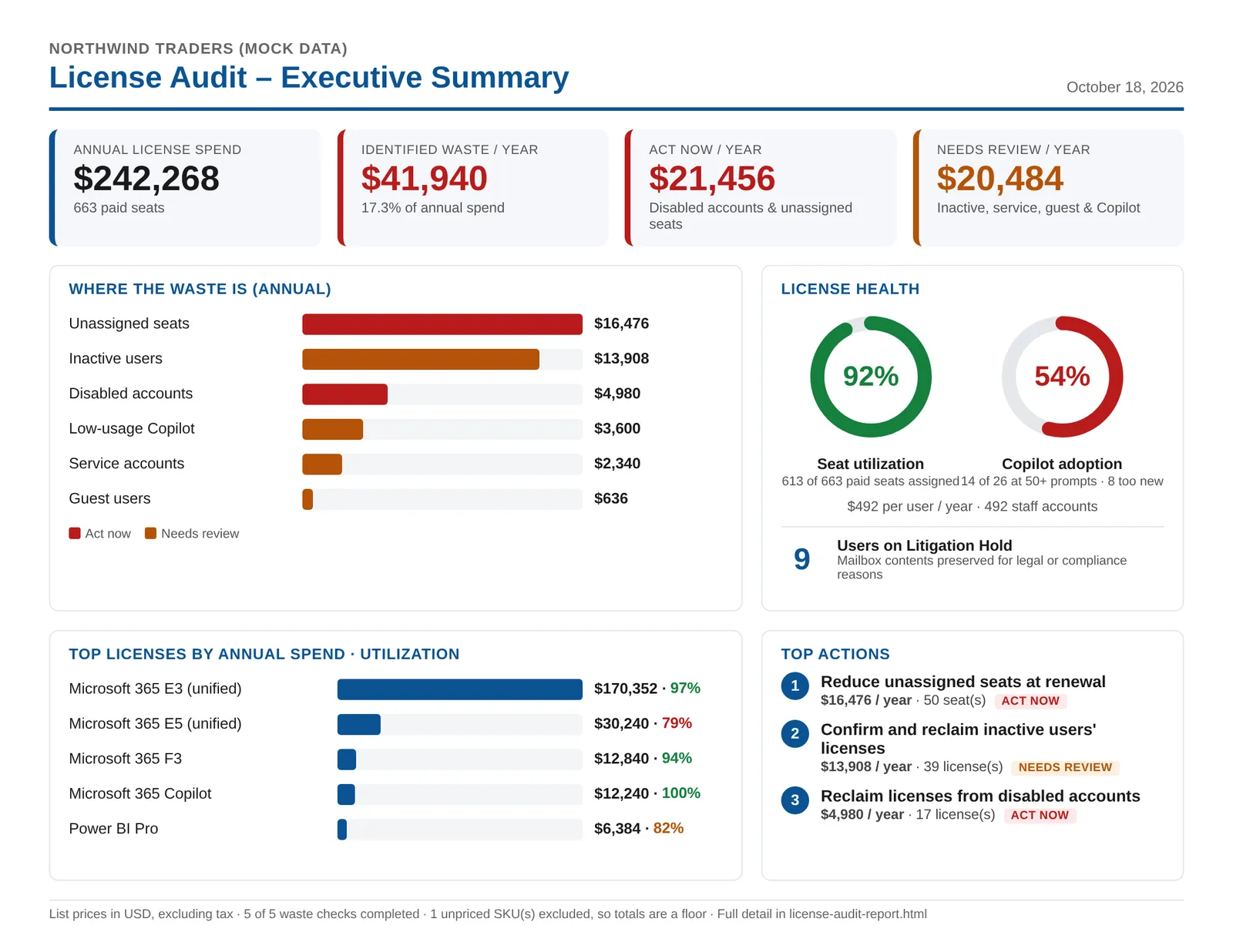
It reads every license your tenant buys and every one assigned, matches them against Microsoft 365's usage reports, and prices the waste with your license prices.
What it looks for
- Unassigned seats: licenses you pay for that nobody holds
- Disabled accounts that still hold paid licenses
- Inactive users: no activity in any Microsoft 365 workload for 90 days, or the period you set (accounts newer than that are left out)
- Service accounts on E3 and E5 suites, matched by name (svc-, admin-, room- and so on, or your own pattern)
- Guests with paid licenses
- Low-usage Copilot: fewer than 50 prompts in 90 days, or the threshold and period you set (new assignments are left out)
- Litigation Hold: the mailboxes on hold, so you don't reclaim a license that keeps evidence (needs Exchange Online)
The executive summary
Annual license spend; waste per year, split into what to act on now and what needs review; where the waste is; seat utilization and Copilot adoption; your top licenses by annual spend; and the top actions, in order.
If your tenant hides user names in its usage reports, the checks that need them say so instead of guessing.
The tenant health audit
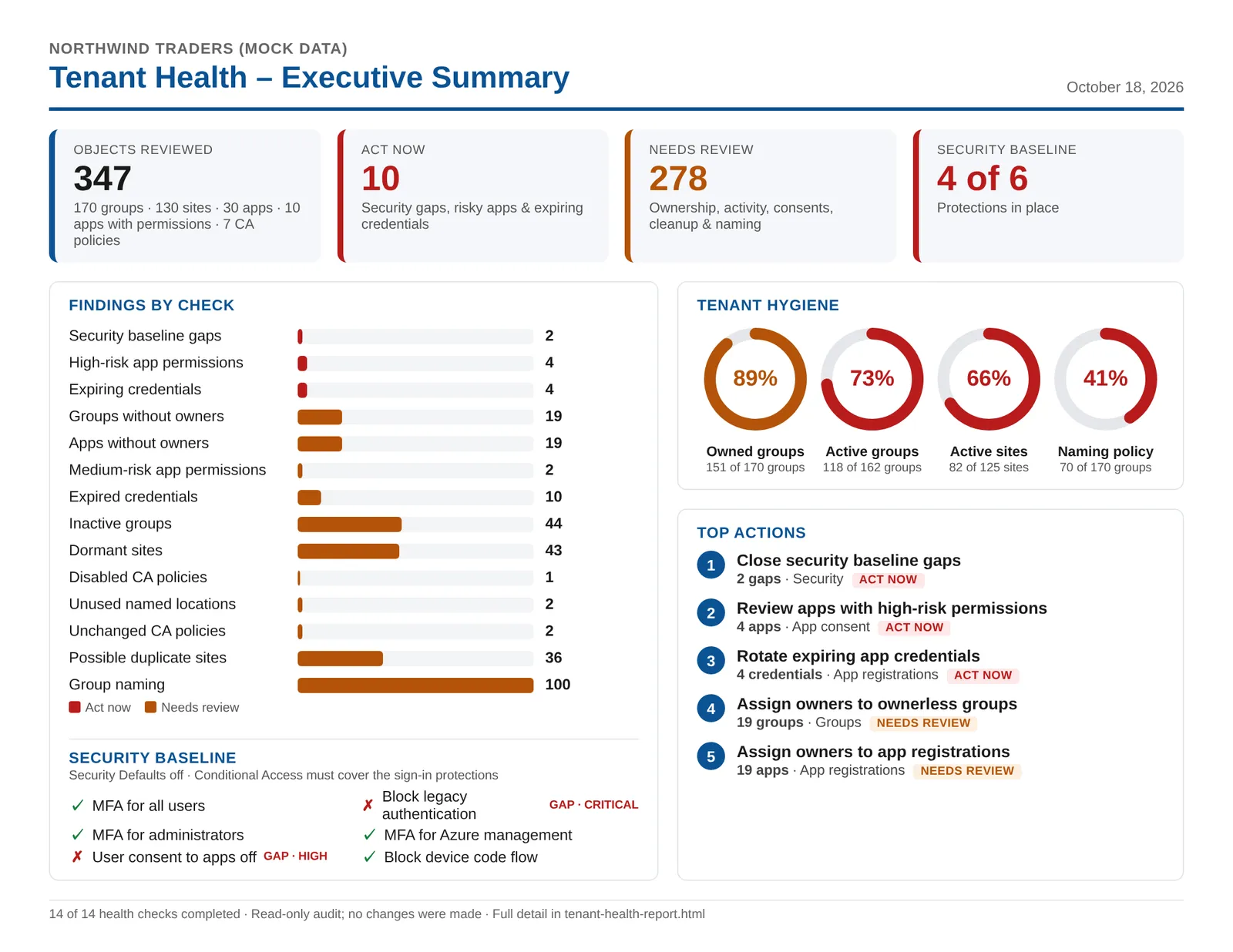
Fourteen checks across your security baseline, apps, groups, SharePoint and Conditional Access, each marked act now or needs review.
The security baseline
Six protections: MFA for all users, MFA for administrators, MFA for Azure management, legacy authentication blocked, user consent to apps turned off, and device code flow blocked. With Security Defaults off, it checks your Conditional Access policies provide them.
The checks
- App consent: apps holding high-risk and medium-risk permissions
- App registrations: secrets and certificates that have expired or expire within 30 days, and apps with no owner
- Groups: no owner, no activity in 90 days, and names that break your naming policy
- SharePoint: sites with no activity in 90 days, and possible duplicates
- Conditional Access: disabled policies, policies unchanged for a year, and named locations no policy uses
App risk is a heuristic based on the permissions an app holds and whether its publisher is verified: a reason to look, not a verdict.
Results
From one page for leadership to every row for your team
Executive summaries
One page per audit with totals only, made to be shared. Download it as a PDF or an image. Every plan.
Detailed reports
Every finding behind the summary, with the users, groups, apps and sites involved. Save as PDF with every list expanded, on Letter or A4. Standard and Pro.
The data
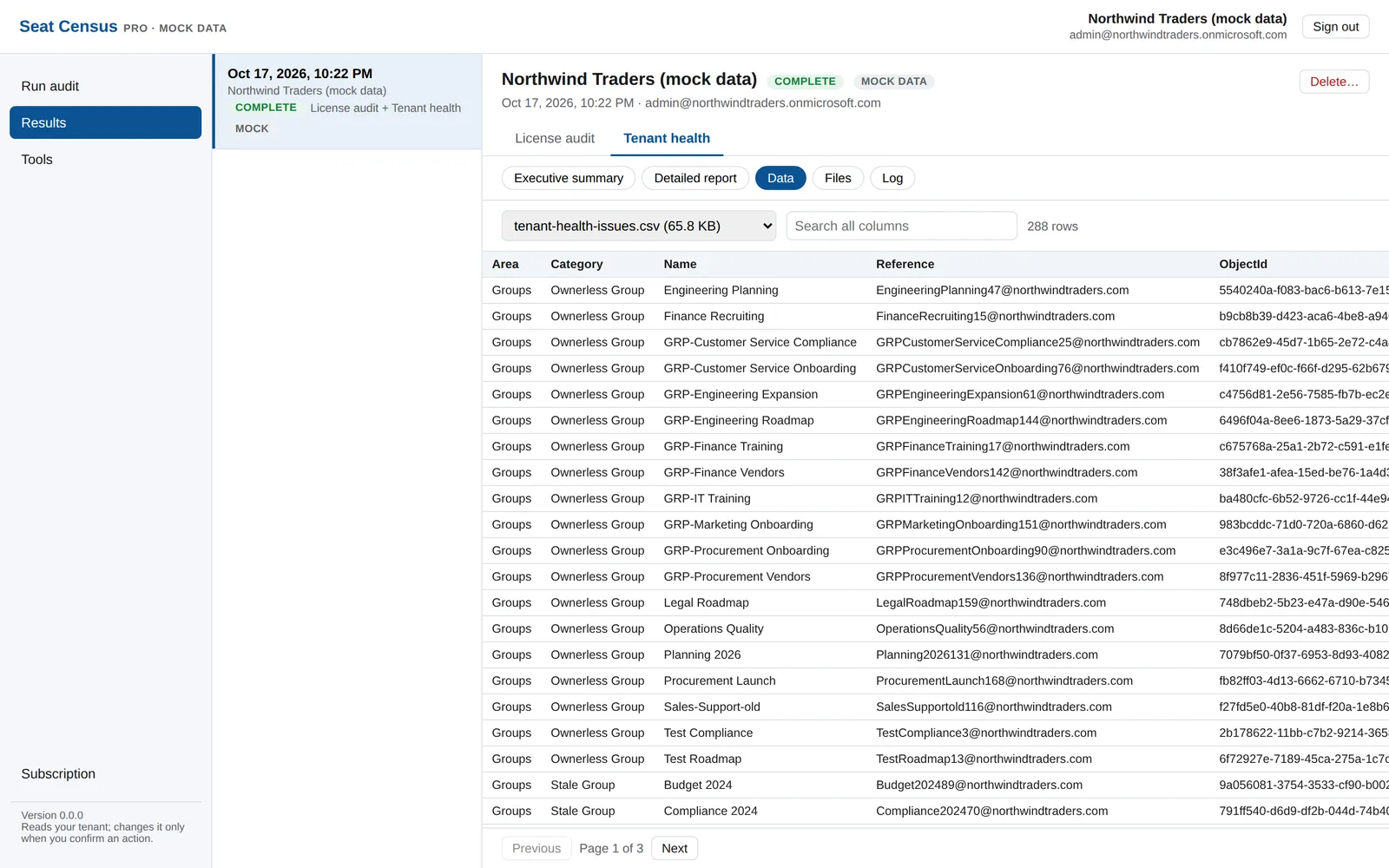
Every table the audits produce, searchable and sortable in the browser, plus the files and the audit's log, and the live log while it runs. Pro.
History and settings
Keep every audit and delete the ones you don't need; change the thresholds and enter the prices you actually pay. Standard and Pro. The free plan keeps your latest audit.
Tools
The fifteen tools
Quick, read-only lookups in every plan. Each result can be copied (to paste into a spreadsheet, an email or a ticket), exported as CSV, or saved as a dated PDF that records the tool, the tenant, the inputs, who looked it up and when.
User access summary
Whether a user can sign in and when they last did; each license, whether assigned directly or by which group, and what it costs a month and a year; active admin roles, every group including nested ones, administrative units, and the groups and apps they own.
Sign-in check
"Why can't they sign in?": whether sign-in is allowed, the last interactive and successful sign-ins, when the password last changed, MFA methods registered, the latest sign-ins with Microsoft's error and reason, and the Conditional Access policies applied. Sign-in logs need Entra ID P1 or P2.
User's devices
A user's devices in Intune and Entra ID: operating system, corporate or personal, how it's joined, compliance, encryption and last check-in, flagging devices silent for 30 days.
Guest user lookup
For one guest: whether they accepted the invitation, how they sign in, who invited them and when, their sponsors, and what they can reach. With Exchange Online, the files and sites shared with them over the last 30 to 180 days, and whether each is still shared.
Who changed this?
The Entra ID audit log for a user, group, app, device or Conditional Access policy over the last day, 7 or 30 days: when, what, who or which app, and each property from its old value to its new one.
User data summary
How full a mailbox, its Recoverable Items, its archive and its owner's OneDrive are against their quotas, the largest folders, and every hold that keeps data.
Mail forwarding and inbox rules
Mailbox forwarding, inbox rules that forward, redirect, delete or hide mail (flagged High, Medium or Low), automatic replies, and whether your outbound spam policies block forwarding outside.
Mailbox access
Who has Full Access, Send As, Send on Behalf or calendar permissions on a mailbox, including delegates, and which other mailboxes its owner can get into.
Message trace
Whether messages from a sender, to a recipient, or both were delivered over the last 1 to 10 days, and for those that weren't, why: quarantined, filtered as spam, bounced or pending.
Dynamic distribution groups
The dynamic distribution groups a user is a member of, worked out from each group's filter.
Where a group is used
Everywhere a group is named: Conditional Access, licenses assigned through it, enterprise apps and admin roles, groups it's nested in, its team, site and email address, and Intune policies, apps, scripts and profiles.
Team or site access
For a team, group or site: owners and members (guests and nested groups marked), private and shared channels' own members, your external sharing setting, and files and folders with their own sharing links or permissions.
Enterprise app lookup
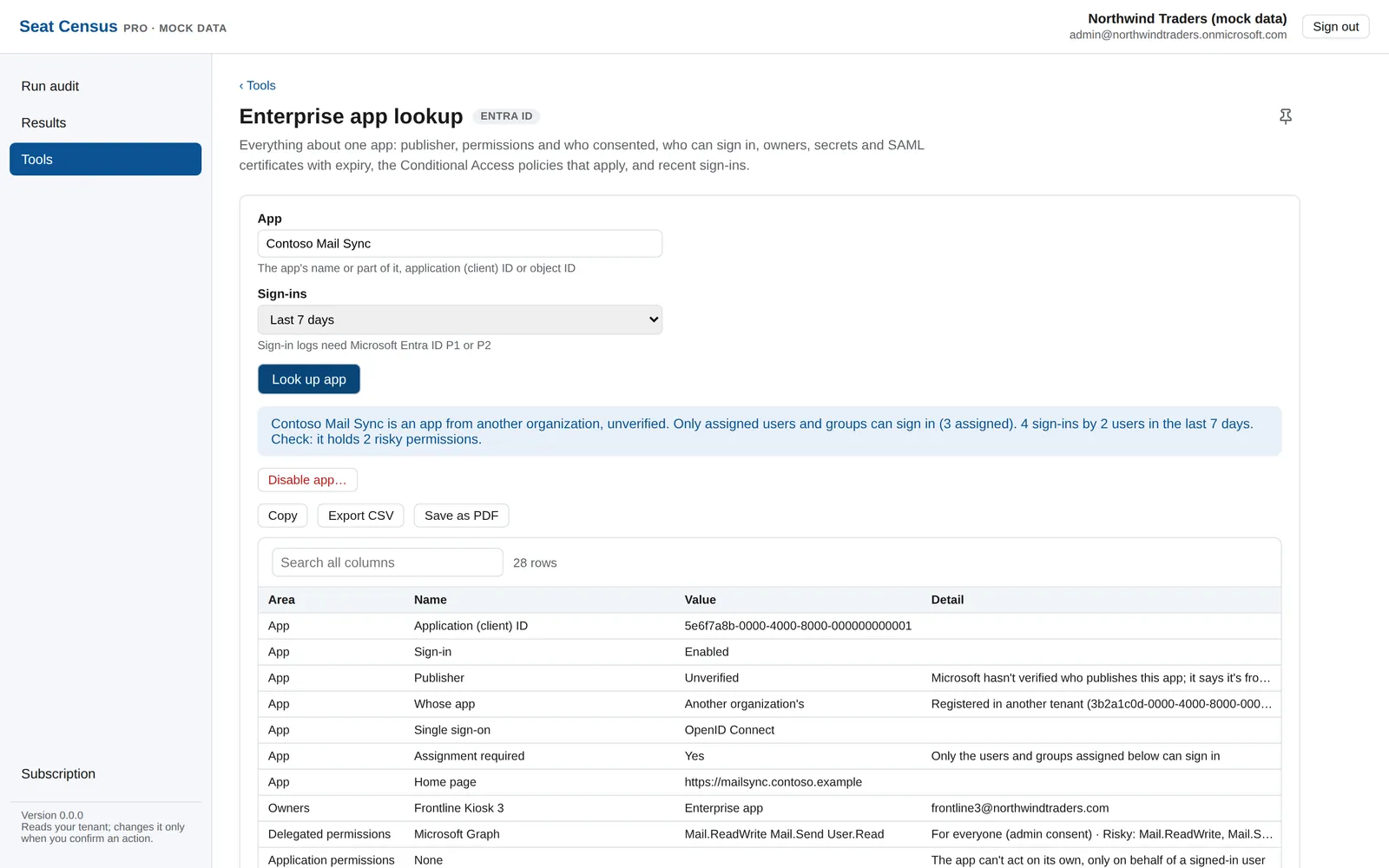
Everything about one app: publisher and whether it's verified, delegated and application permissions with the risky ones marked, consents, assignments, owners, secrets and certificates with expiry, the Conditional Access policies that apply, and recent sign-ins.
Teams call forwarding
Where a user's Teams calls go: forwarding or simultaneous ring, unanswered calls, their call group and delegates, and their phone number.
Phone number lookup
Who a phone number belongs to: a user, an auto attendant or call queue, audio conferencing, or nobody. With or without a country code.
Actions
Changes only when you say so
Seat Census reads; it doesn't change your tenant on its own. The one place it can is the enterprise app lookup, which offers Disable app, Enable app and, for a disabled app, Delete app.
- You confirm every change in the app, and it runs only if your latest lookup offered exactly that change
- The permission to make changes isn't part of sign-in: Microsoft asks for it the first time you run an action
- The Microsoft services your tenant runs on, and Seat Census itself, are never touched, and Microsoft's own apps can't be deleted
- A deleted enterprise app stays restorable in Entra ID for 30 days
What you need
Requirements
A Global Administrator
Seat Census checks for an active Global Administrator role at sign-in. With Privileged Identity Management, activate the role first.
A browser
Current Edge, Chrome, Firefox or Safari on a computer. There's nothing to install: no PowerShell, no modules, no app.
Exchange Online and Teams, if you have them
The Litigation Hold check and the Exchange tools need Exchange Online, and the Teams tools need Microsoft Teams. Without them, everything else still runs.
Entra ID P1 or P2, for sign-in history
Sign-in logs and last sign-in times come from Microsoft Entra ID P1 or P2. Without it, the tools that use them say so.